


Changing the Order and Width of Columns
This section describes how to change the order of columns on iLOQ 5 Series Manager.
Proceed as follows.
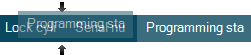
- Drag the column header to the desired location. The black arrows indicate the new location for the column.
- PreviousSaving the Print View
- NextMass Calculation
