


Suorita tehtäviä ohjelmointiavaimella
Kun suoritat tehtäviä ohjelmointiavaimella , kyseinen tuote on asetettava tietokoneeseen yhdistettyä ohjelmointiavainta vasten.
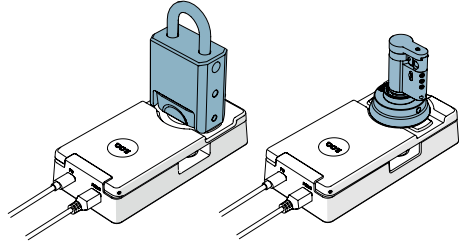
Tuotteita voidaan asettaa ohjelmointiavainta vasten kahdella tavalla:
Ohjelmointiavaimen kautta
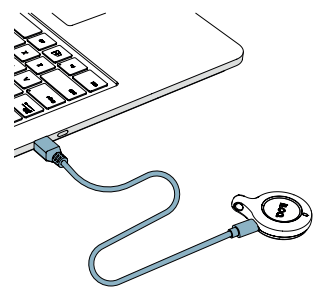
- Yhdistä ohjelmointiavain tietokoneen USB-porttiin USB Micro-B -kaapelilla.
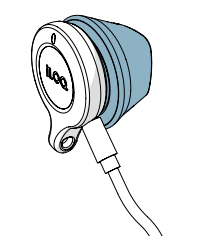
- Aseta tuote ohjelmointiavainta vasten.
Ohjelmointiavaimen ja ohjelmointiadapterin kautta
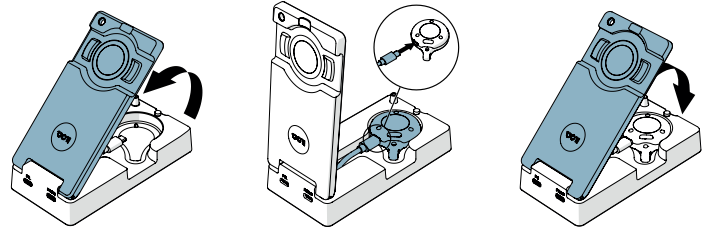
- Yhdistä ohjelmointiavain ohjelmointiadapterin sisällä olevaan erilliseen USB-kaapeliin.
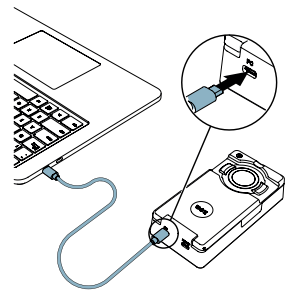
- Yhdistä ohjelmointiadapteri (PC-portin kautta) tietokoneeseen tavallisella USB Micro-B -kaapelilla.
- Aseta tuote ohjelmointiadapterin ohjelmointialueelle.
- EdellinenHallinnoi ohjelmointiavaimia
- SeuraavaLisää ohjelmointiavain
