Aufgaben mit dem Programmiertoken ausführen
Wenn Sie Aufgaben mit dem Programmiertoken ausführen , muss das betreffende Produkt an ein mit einem Computer verbundenes Programmiertoken gehalten werden.
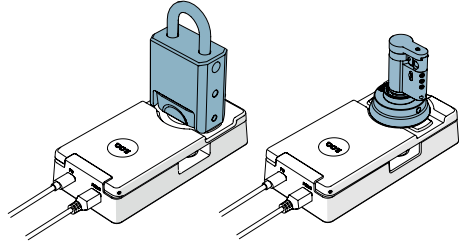
Es gibt zwei Möglichkeiten, Produkte an ein Programmiertoken zu halten:
Über Programmiertoken
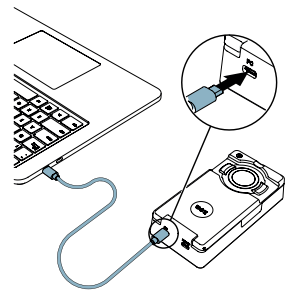
- Verbinden Sie das Programmiertoken mit einem USB-Micro-B-Kabel mit dem USB-Anschluss eines Computers.
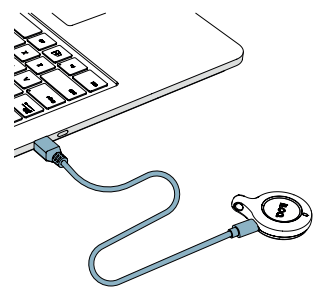
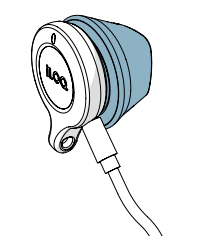
- Halten Sie das Produkt an das Programmiertoken.
Über Programmiertoken und Programmieradapter
- Verbinden Sie das Programmiertoken mit dem speziellen USB-Kabel im Inneren des Programmieradapters.
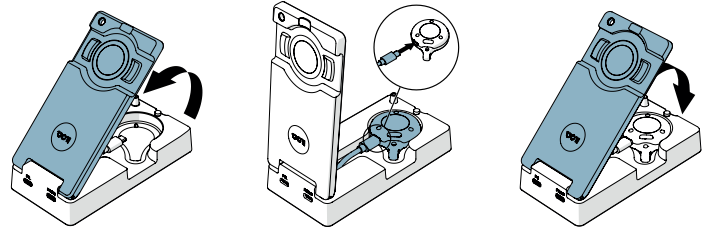
- Verbinden Sie den Programmieradapter (über den PC-Anschluss) mit einem Standard-USB-Micro-B-Kabel mit dem Computer.
- Legen Sie das Produkt auf den Programmierbereich des Programmieradapters.